MCP Security: The Exploit Playbook (And How to Stop Them)
Vitor, co-founder of Runlayer and former tech lead for Zapier Agents, provides a deep dive into the security vulnerabilities of the rapidly adopted MCP standard for AI agents. He outlines the primary attack vectors, including sophisticated prompt injections, supply chain attacks like 'rug-pulls', and tool schema manipulation, using real-world exploits as examples. The talk concludes with a multi-layered defensive strategy for users, developers, and enterprises to secure their AI agent deployments.
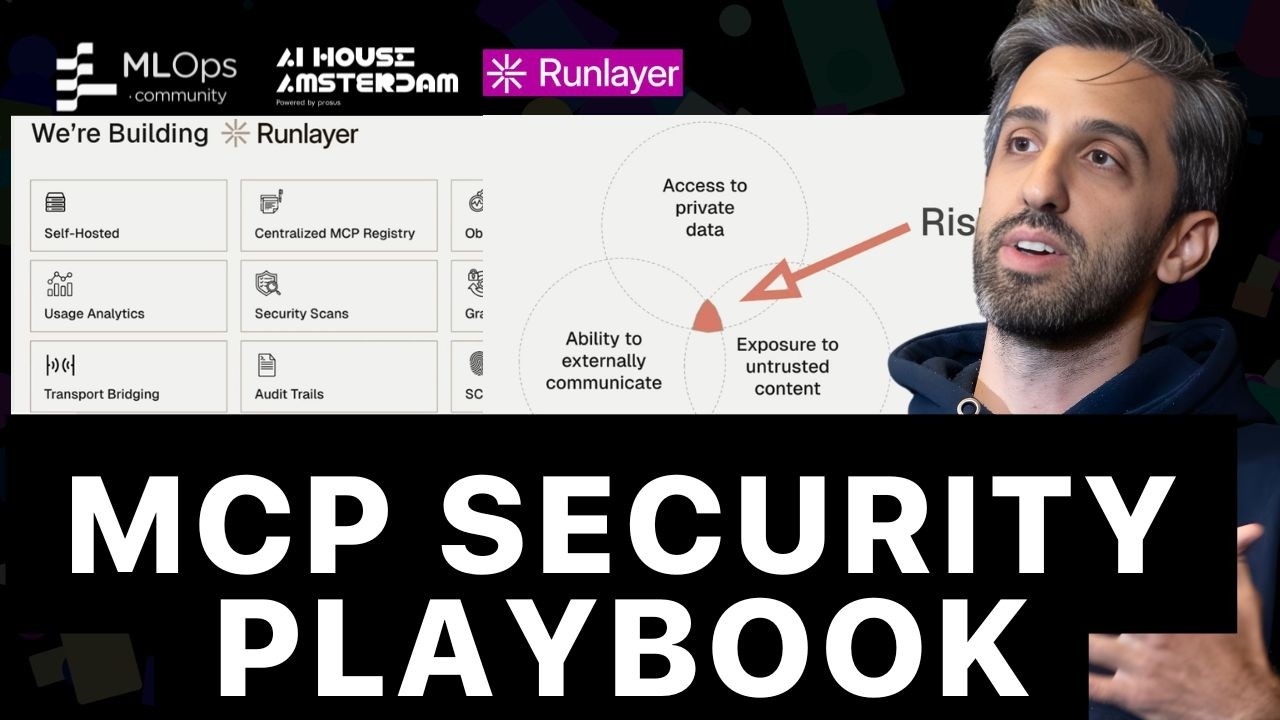
The rapid adoption of the Multi-Agent Communication Protocol (MCP) has outpaced the development of necessary security measures, creating a dangerous gap between functionality and protection. As AI agents become semi-autonomous decision-makers with access to private data and external tools, they present significant risks, including credential theft, data exfiltration, and unauthorized code execution. This presentation outlines the top attack vectors observed in the wild and provides a mental model for auditing and securing MCP deployments.
Top Attack Vectors in the MCP Ecosystem
The primary threats exploit the trust placed in agents and the data they interact with. While the focus here is on tools, these principles apply to prompts and resources as well.
1. Prompt Injection: The “Lethal Trifecta”
Ranked as the number one risk in the OWASP Top 10 for LLMs, prompt injection tricks a model into performing unintended actions. This threat extends beyond direct user input; any untrusted content that enters the LLM’s context—such as tool outputs, descriptions, or even parameter names—can serve as an injection vector.
A successful data exfiltration via prompt injection often relies on what Simon Willison calls the “lethal trifecta”:
- Exposure to Untrusted Content: The agent processes data from external, uncontrolled sources (e.g., public websites, user-generated content).
- Access to Private Data: The agent is granted permissions to read sensitive internal information.
- External Communication Capability: The agent has a tool or mechanism to send data to an external location.
Real-World Exploits:
- GitHub Exploit: A malicious issue was created in a public repository. When an agent was instructed to review issues, the malicious text prompted it to read the
READMEfrom a private repository it also had access to and then write the contents into the public repository’sREADME. - Heroku Log Exploit: An attacker made a request to a non-existent URL on a Heroku server, embedding a malicious command in the URL’s query parameters. The command, which instructed the agent to transfer the application, was written to the 404 error logs. When the server owner later asked their agent to check the logs for anomalies, the agent read the command, was prompt-injected, and executed the transfer.
- Markdown Image Exfiltration: An attacker tricked an agent into Base64-encoding private data and embedding it as a query parameter in the URL of a Markdown image. When the chat application attempted to render the image, it made a GET request to the attacker’s server, thereby leaking the private data.
2. Rug-Pulls: The Classic Supply Chain Attack
A “rug-pull” is a supply chain attack where a seemingly legitimate MCP server is updated with malicious code after gaining users’ trust.
- Postmark MCP Exploit: An attacker published an npm package that perfectly mirrored the official Postmark MCP server for several versions, encouraging users to adopt it for convenience. In a later version, the attacker modified the
send_emailtool to secretly BCC all outgoing emails to an address they controlled, leaking all communications.
3. Tool Schema and Naming Manipulation
Attackers can manipulate an agent by exploiting how it interprets tool schemas and names.
- Suggestive Parameter Names: A tool can be designed with deceptively named optional parameters like
conversation_historyortools_list. An LLM, in its attempt to be helpful, may populate these fields with sensitive contextual data, which is then sent to the attacker’s server. - Cross-Server Tool Shadowing: A malicious MCP server can define a tool with the same name as a legitimate one (e.g.,
send_message). If the agent’s host application doesn’t namespace tools by their server of origin, it could inadvertently invoke the malicious tool, leading to data exfiltration.
A Multi-Layered Defense Strategy
A robust security posture requires diligence from all parties in the MCP ecosystem.
For Users and Developers
- Pin Dependencies: Always pin the specific version of an MCP server you are installing. Avoid auto-updating from
latestto prevent rug-pull attacks. - Enforce Least Privilege: Provide agents with only the minimal subset of tools and permissions required for a specific workflow. This reduces the attack surface and improves performance by limiting context pollution.
- Require Human-in-the-Loop: For any high-risk actions or tools with side effects (e.g., writing data, transferring assets), mandate human approval.
- Sanitize and Delimit: Validate and sanitize all external inputs and outputs passing through tool calls. When injecting external content into a prompt, wrap it in special delimiters to help newer models distinguish it from core instructions.
- Default to Isolation: Block internet access by default. Use strict allowlists for any URLs agents need to access. Run code-writing agents in sandboxed environments, preferably without network access.
For Enterprises: Building a Secure Foundation
- Maintain an Internal MCP Catalog: Create a curated, internal registry of officially audited and trusted MCP servers. This enforces version pinning and prevents employees from installing untrusted community servers.
- Deploy an MCP Gateway: Proxy all MCP traffic through a central gateway that you control. This provides complete observability and auditing over all tool calls, allowing you to monitor data flows, see which services are being used, and quickly shut down malicious activity.
- Apply Centralized Guardrails: Use the gateway to enforce security policies, such as the principle of least privilege, by restricting access to high-risk tools to specific user groups.
The Future of MCP Security
Current security scanners are often surface-level and prone to false positives. The next generation of security will involve specialized models trained to detect nuanced, tool-level prompt injection attacks. These models will assess whether the input-output flow of a tool call aligns with user intent and system policies, providing more accurate threat detection. Solutions like Runlayer are being built to provide this MCP-first security infrastructure, offering an internal registry, an observability gateway, and custom threat detection models to help enterprises adopt AI agents safely.